Tegus: Panel Calls

Reducing time to insight for investors through Panel Calls

TIMELINE

May 2023 - Aug 2023

TOOLS

Figma

Hotjar

DISCIPLINE

Product Design

Product Thinking

UX Research

TEAM

1 Product Designer

2 Engineers

1 Product Manager

ROLE

As a Product Design Intern at Tegus, I took full ownership of this project, serving as the sole designer and leading it from concept to completion.

WHAT IS TEGUS?

Tegus is a research platform for institutional investors, offering a vast database of expert insights and investor-driven interviews.

Overview

Investors weren’t reading transcripts—they were too dense to navigate. I rebuilt the experience around clarity and context, boosting engagement from 15% to 40%.

Context

Tegus introduced Panel Calls to 350+ beta users, providing an innovative format for investor research. For investors, transcripts from expert Panel Calls are one of the richest sources of insight on the Tegus platform.


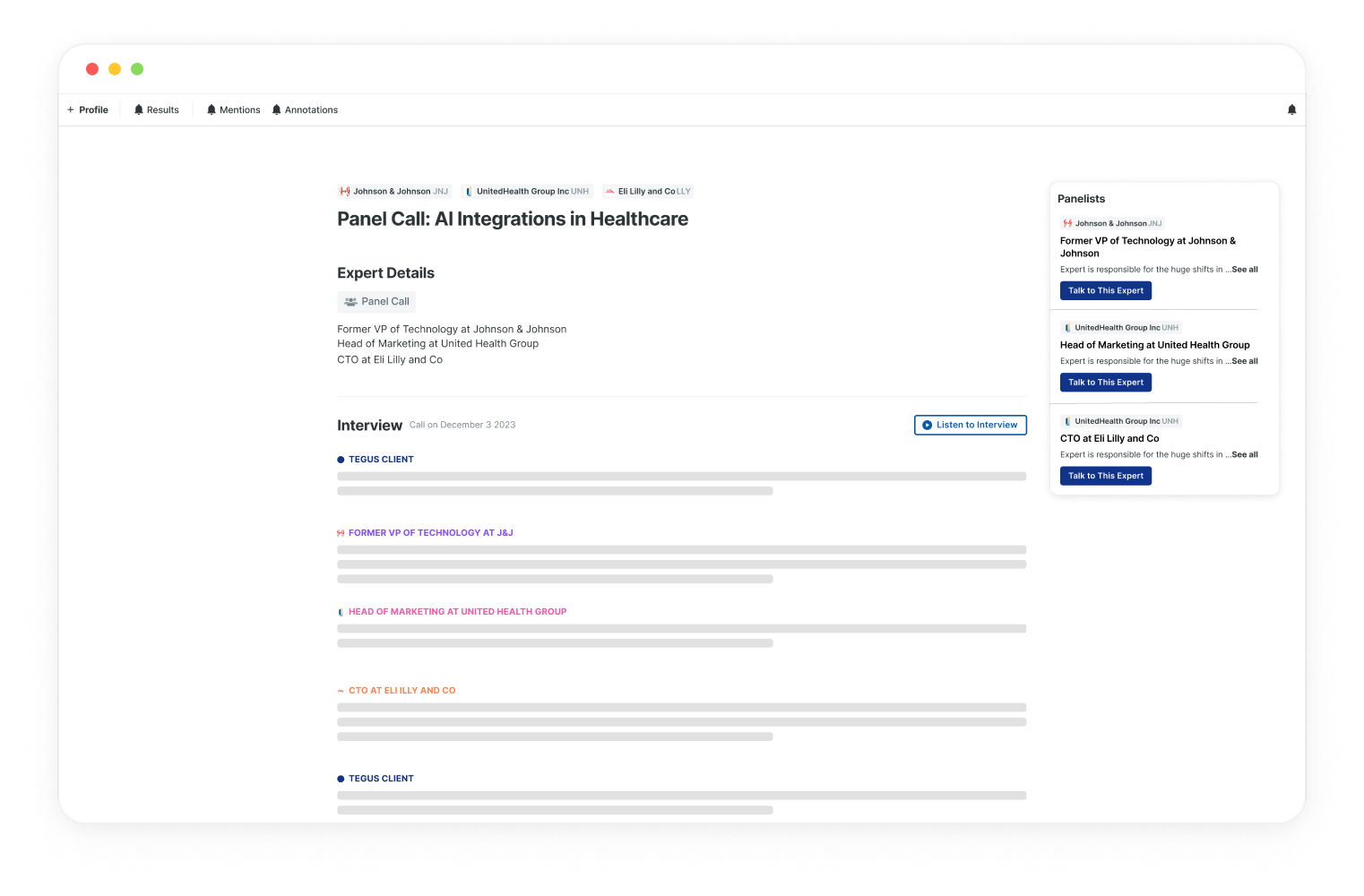
However, the reading experience hadn’t evolved alongside user needs. Most transcripts appeared as long, uniform text blocks with little structure—leaving users without a clear place to start.

Problem

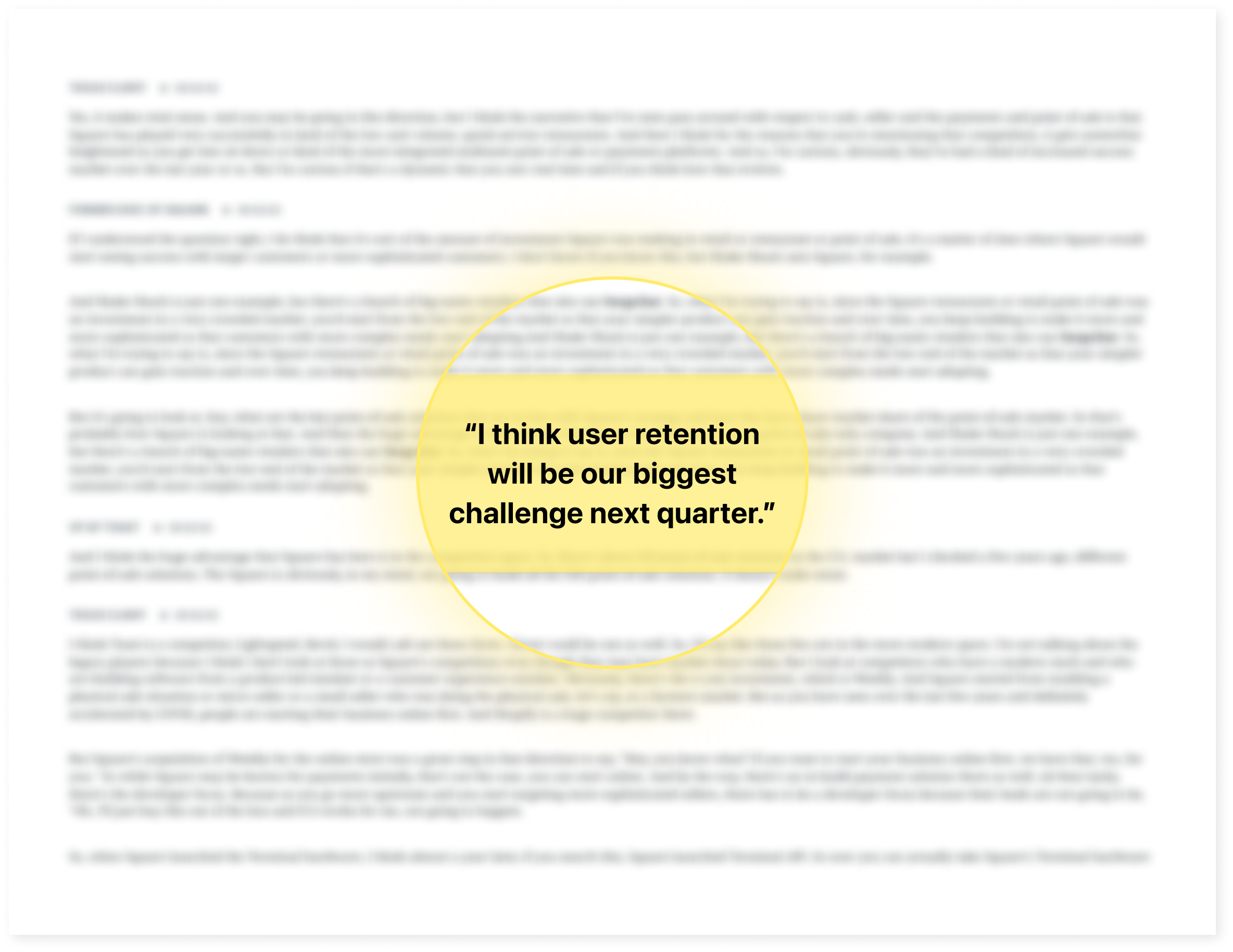
Panel call transcripts are dense and hard to navigate, making it challenging to extract key research insights efficiently.

Solution

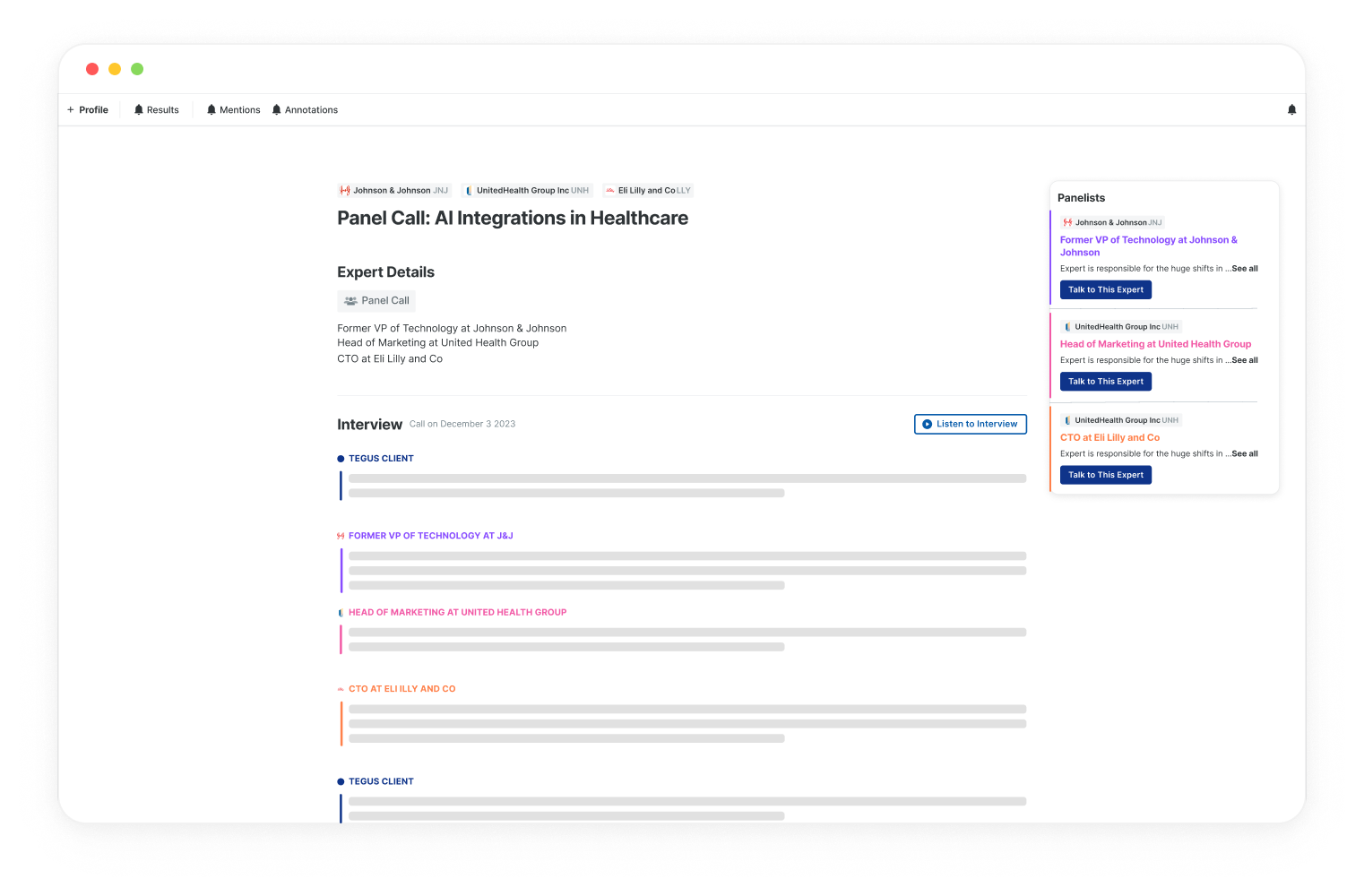
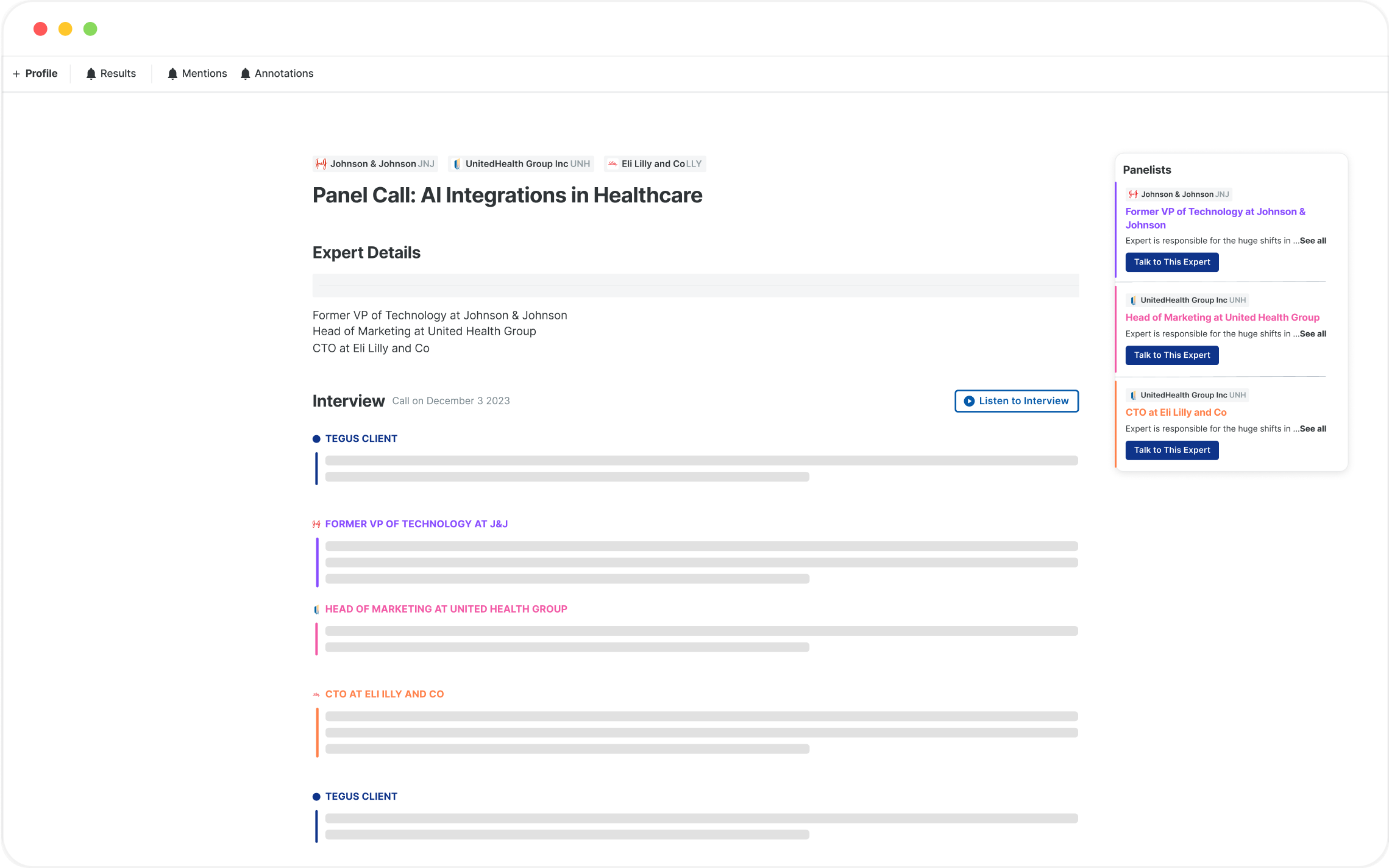
A visually guided and interactive Panel Call transcript for easier research and insight extraction.

Outcome

User engagement increased from 15% → 40% month-over-month

Panel Calls successfully launched to General Availability (GA)

Problem

Problem - Business Focus

We uncovered a shocking metric: 0% of beta users were reading the transcripts.

Despite high interest in the topics, the format was failing. Users were opening the page and immediately bouncing, resulting in a low 14% engagement rate.

Problem - User Focus

Transcripts were dense and difficult to navigate, making it hard for users to quickly find and extract key insights.

There were two main pain points users had due to the current transcript designs:

PAIN POINT 01

Difficult to keep track of who is speaking

who’s talking?

who’s responding to who?

PAIN POINT 02

Constantly forgetting contextual expert details

what’s this expert’s take again?

i forget if this expert has a credible background...

SOLUTION

A visually guided and interactive Panel Call transcript for easier research and insight extraction.

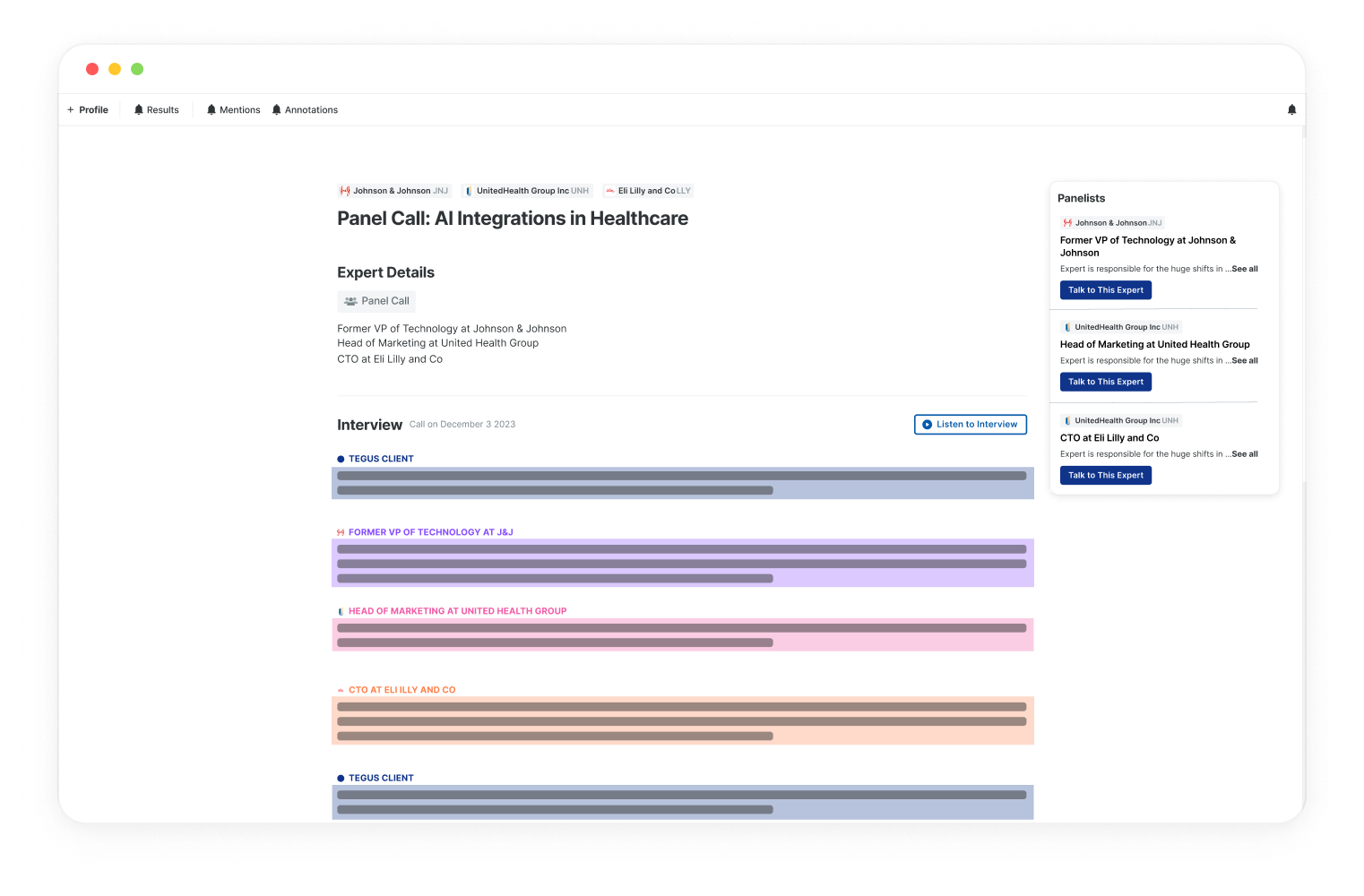
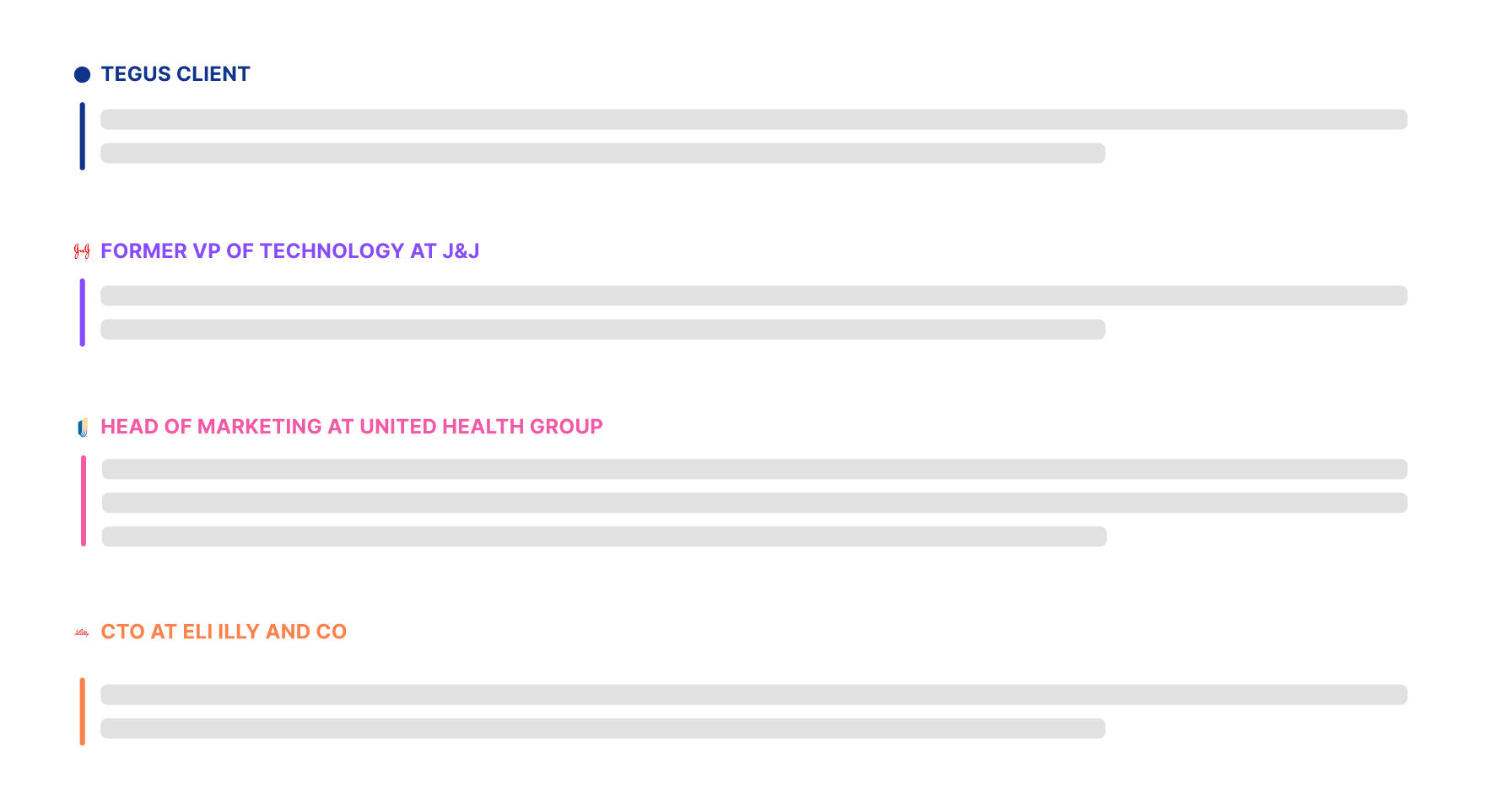
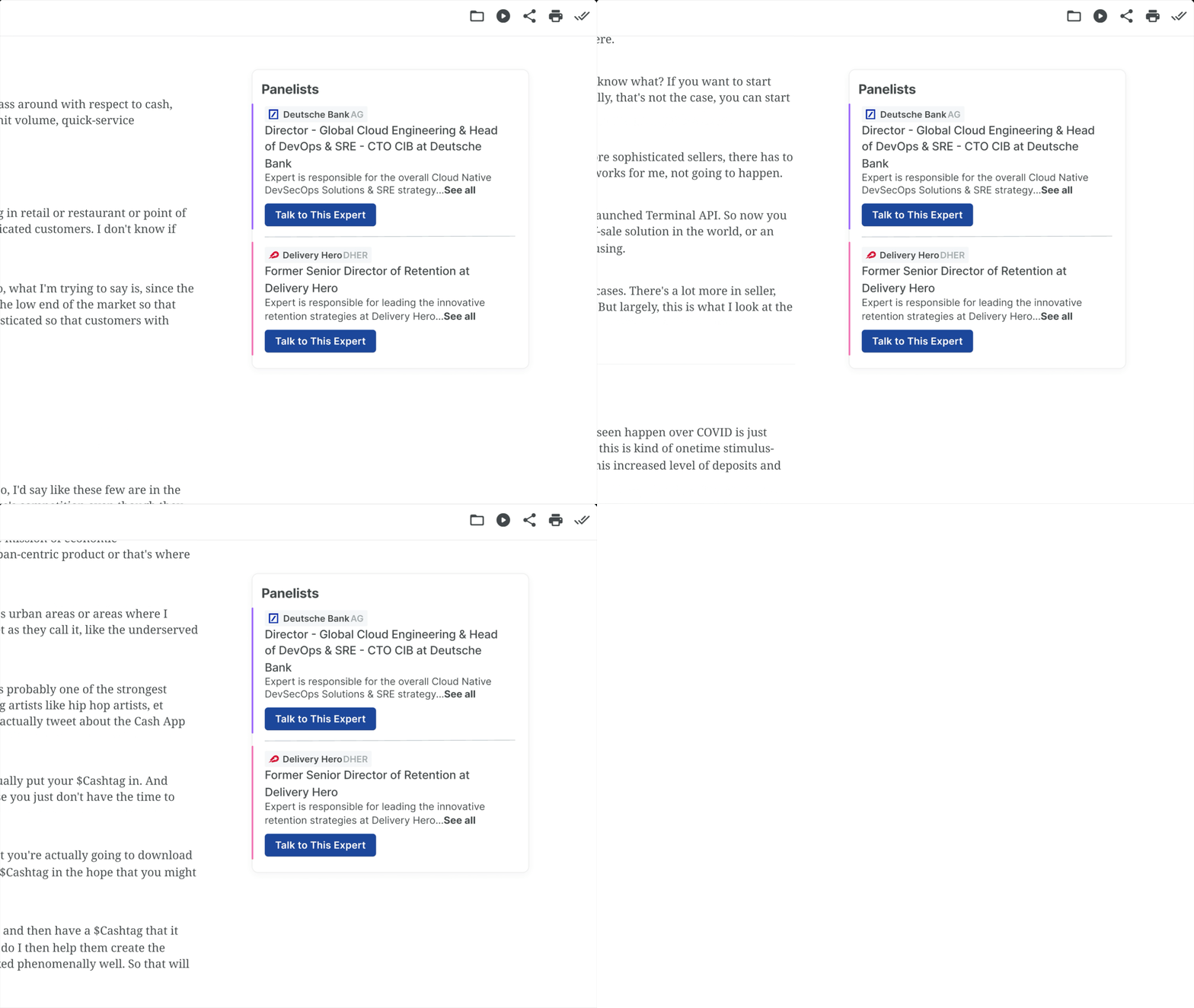
Color-Coding and Visual Distinctions

Implementing color-coding and distinct visual markers for each participant makes it easier to identify speakers and follow the conversation.

Contextual Expert Information

Having important contextual information about the expert in their expert bios follow the user as they read the transcript makes it easier to follow the transcript information.

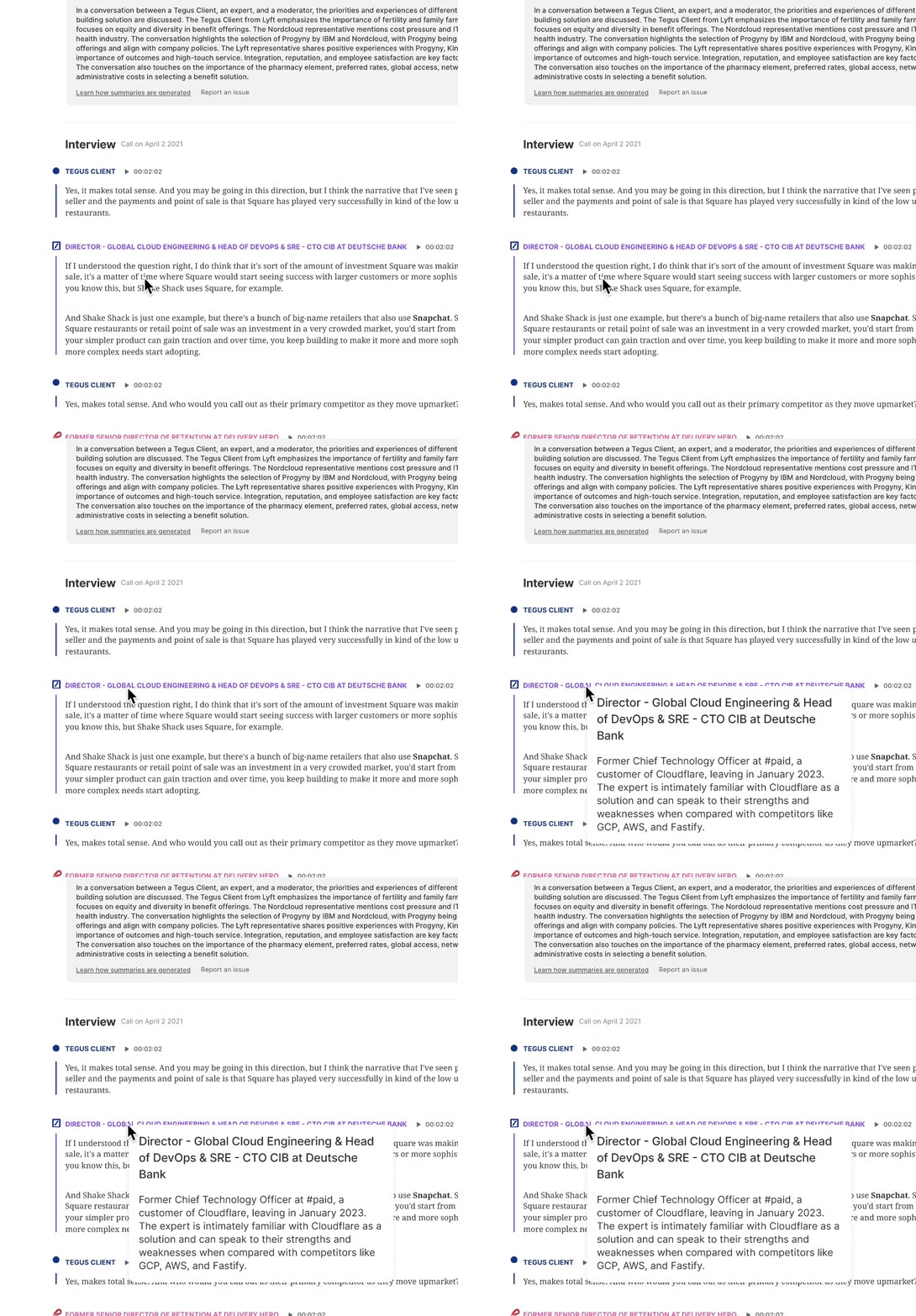
FEATURE #1

Hover-Activated Expert Bios

Hovering over a participant's name offers quick access to expert information

FEATURE #2

Floating Bio Component

A floating component provides continuous expert context while scrolling

PAIN POINT

Difficult to keep trackof who is speaking

SOLUTION

Color-Coding andVisual Distinctions

PAIN POINT

Constantly forgettingcontextual expert details

SOLUTION

Contextual ExpertInformation

Design Process

Starting from Ambiguity

My initial brief was simple and vague: “Improve Panel Calls.”

There were:

  • No clear success metrics
  • No specific part of the experience called out
  • No prior design direction for Panel Calls


So my first task as a designer wasn’t to “make screens” — it was to figure out what problem even mattered.

Identifying Opportunities

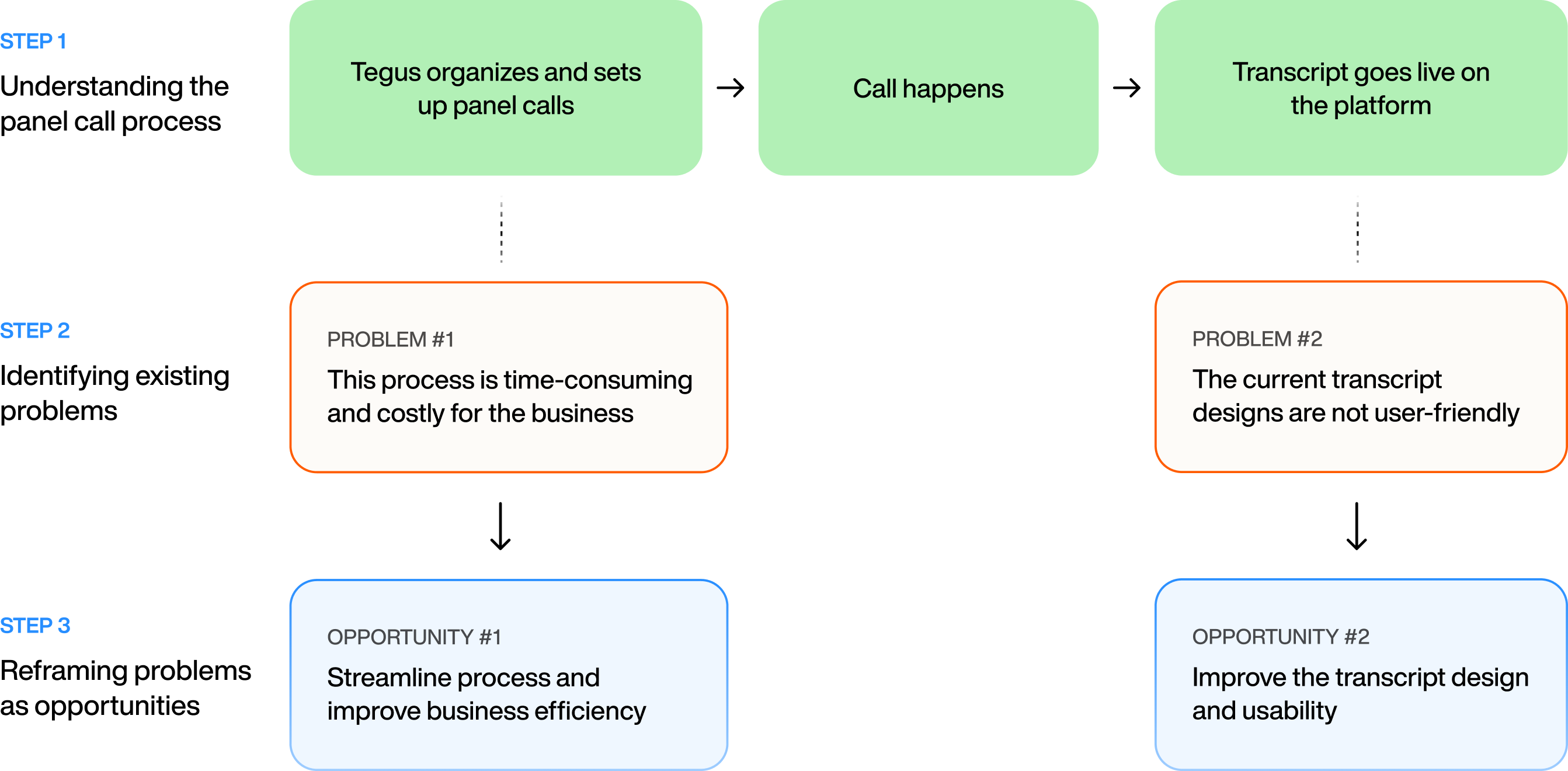
What areas of panel calls can be improved?

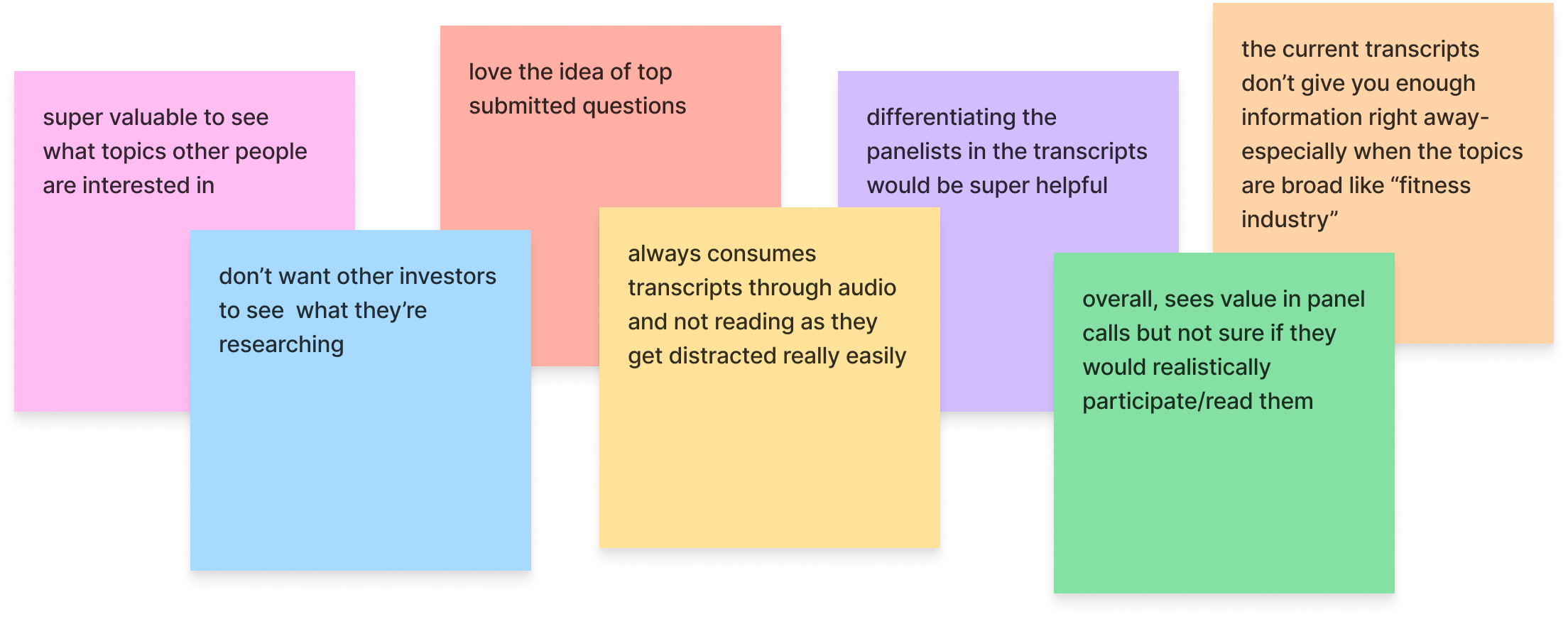
I began by talking to internal teams and reading customer feedback, to get up to speed about current challenges and rooms for improvement within Panel Calls and then identified ways to turn these problems into opportunities.
Turning Opportunities into Potential Solutions

What’s the best way to improve Panel Calls?

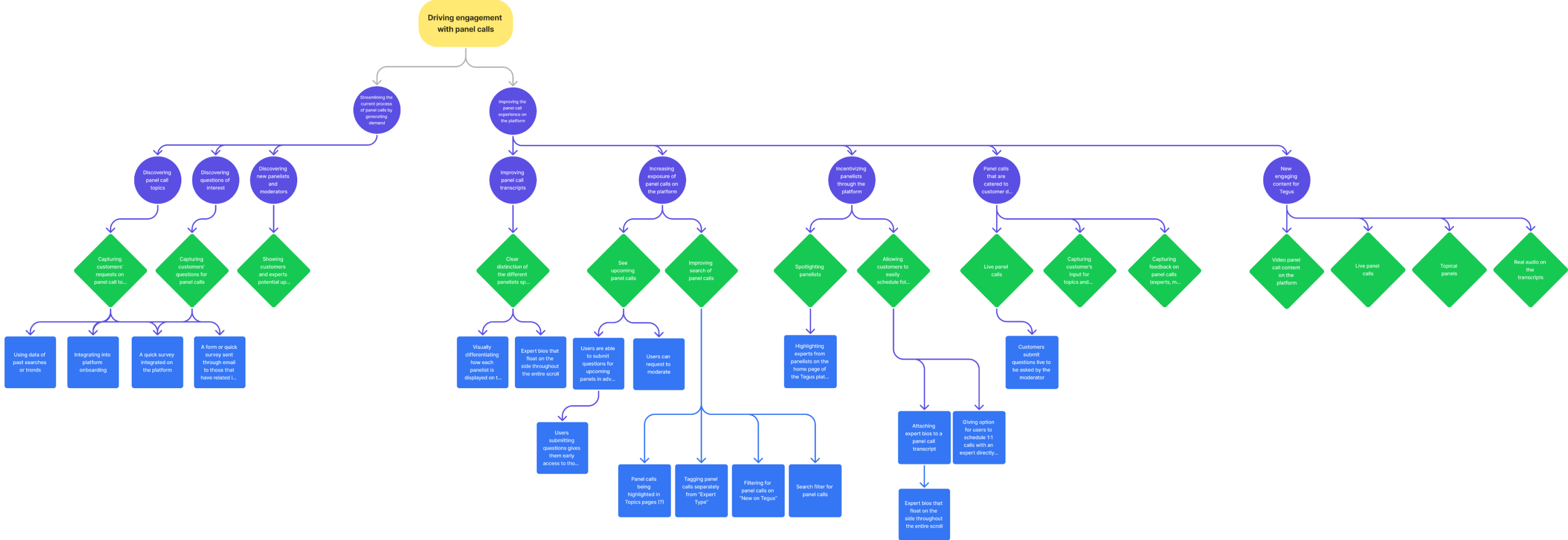
Using an Opportunity Solutions Tree, I explored potential solutions stemming from the two overarching opportunities.

Instead of staying in abstract problem space, I moved quickly into visual explorations so that:

  • Internal stakeholders could react to something concrete
  • Users could respond to actual interfaces, not just questions
  • I could learn faster what really mattered

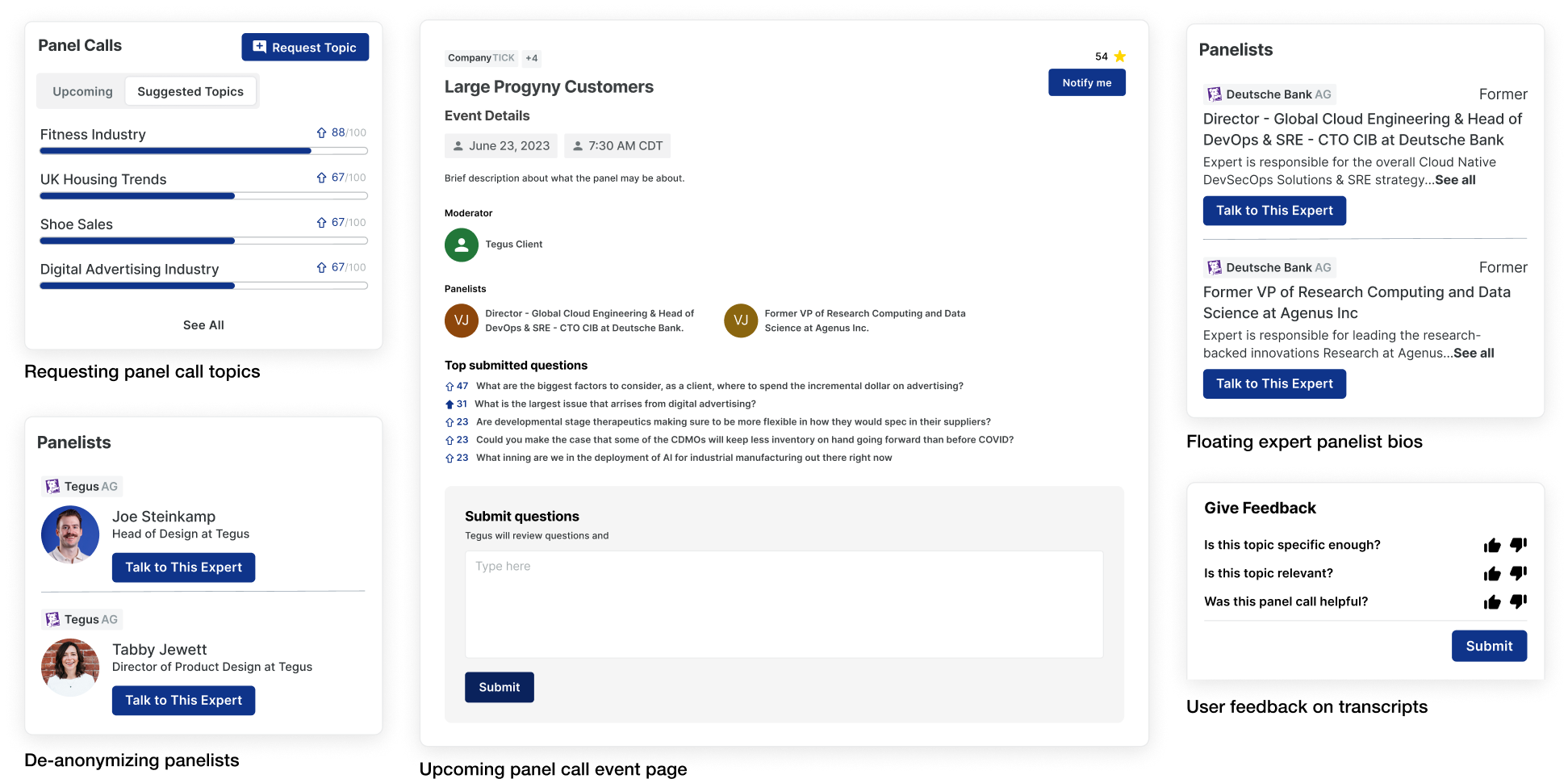
Using my brainstormed concepts, I created high-fidelity prototypes.

User Research: Concept Testing

I had many explorations and ideas but what do the users really want?

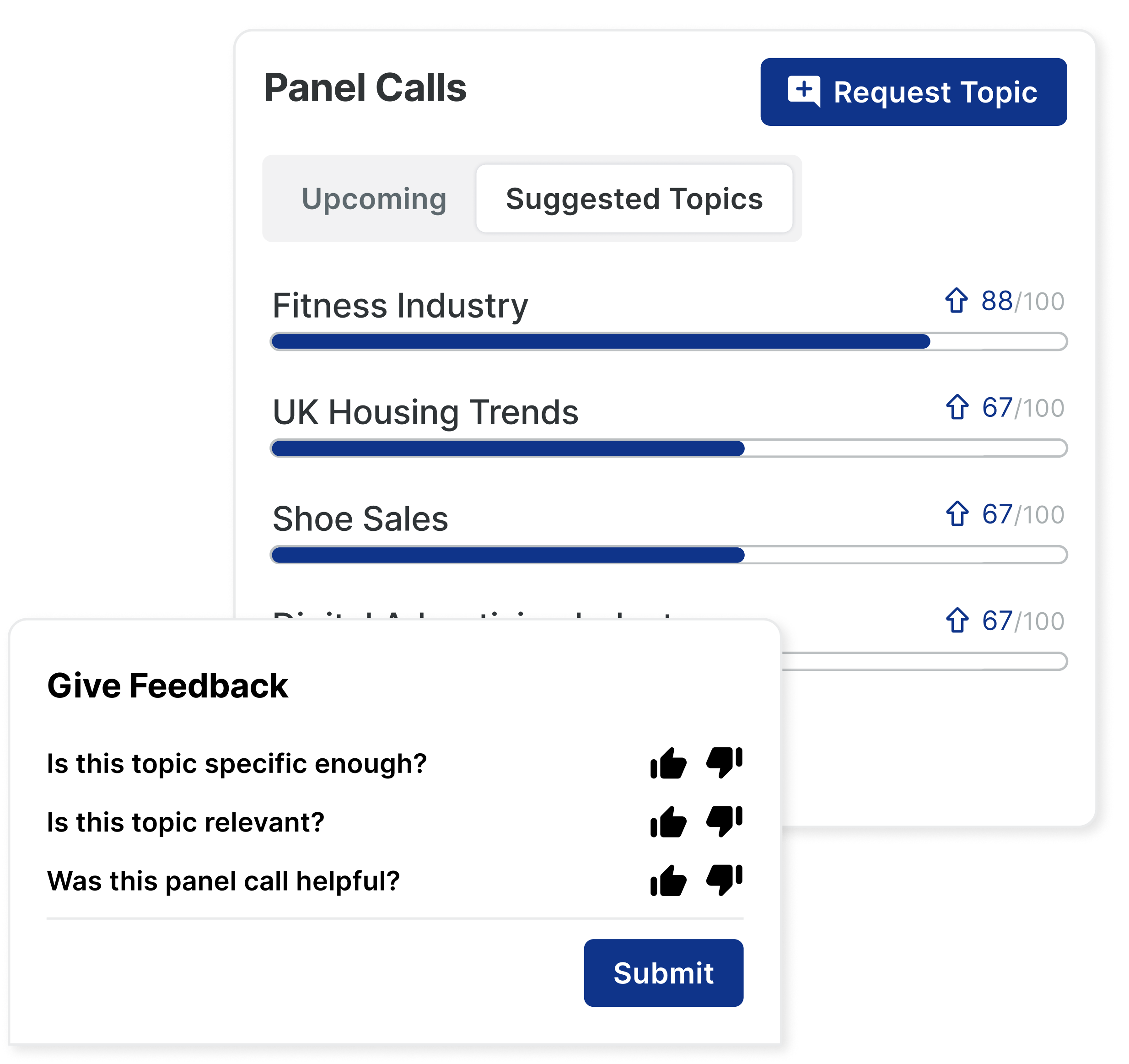
Taking my explorations from the Opportunity Solutions Tree, I engaged users to prioritize proposed solutions and ensure they aligned with user needs through a Hotjar survey and user interviews.

RESEARCH GOAL

Collect user feedback and test real user engagement to early concepts.

METHOD #1

Hotjar Survey

350+ beta users

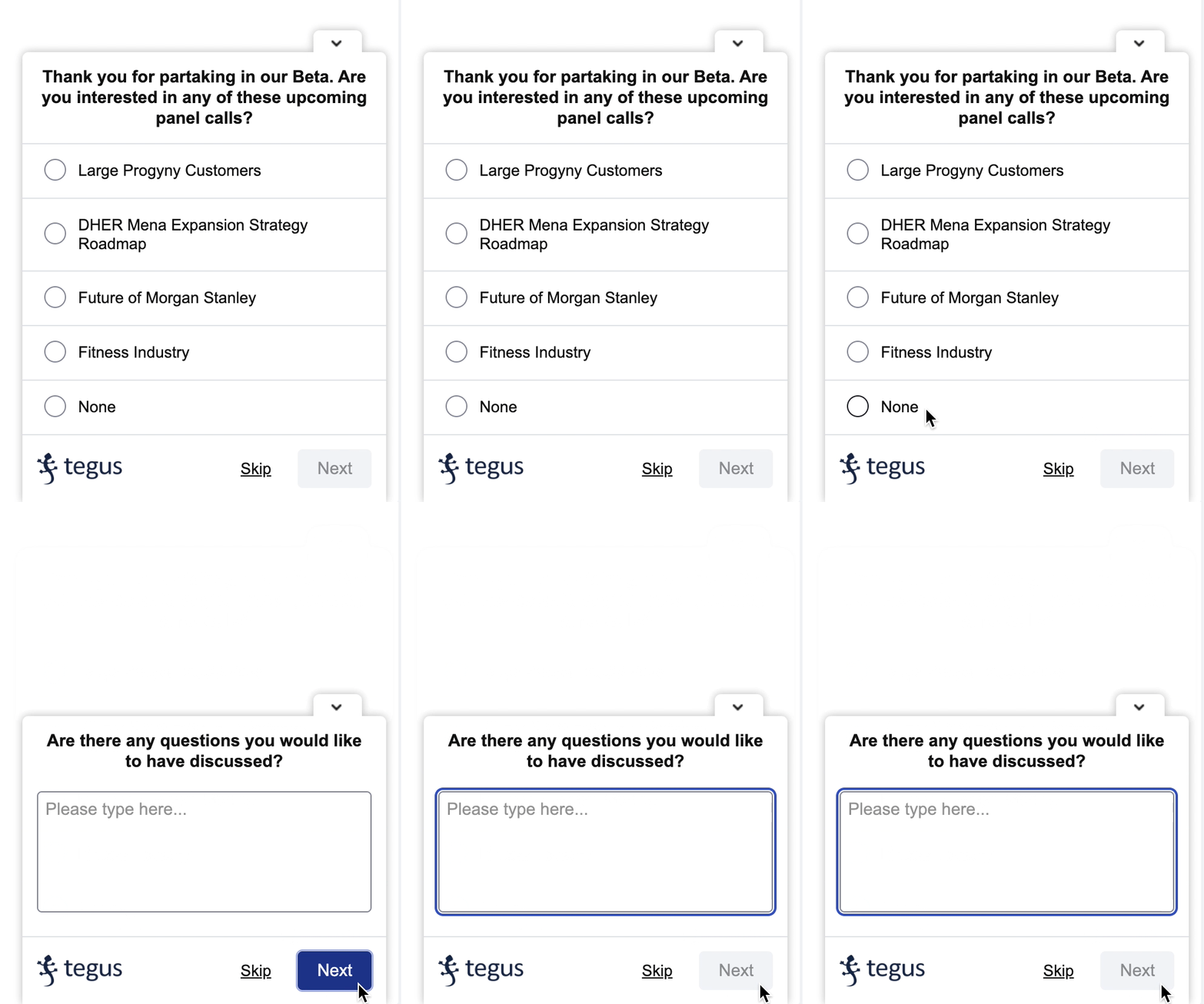
I set up a lightweight MVP on the live platform with an in-product Hotjar survey to test users’ real engagement.

METHOD #2

User Interviews

7 users (5 beta + 2 non-beta)

To allow users to visualize my ideas, I created high-fidelity prototypes and presented my explorations, gathering initial user reactions and feedback.

Research Insights

Research revealed a significant gap between what users said they wanted and how they actually behaved.

KEY INSIGHT #1

The "Say/Do" Gap

Only 6% of users engaged with the topic submission MVP (Hotjar Survey), despite claiming they wanted it.

Pivot: I deprioritized engagement features to focus entirely on the core reading experience.

KEY INSIGHT #2

The Format Mismatch

The existing UI was built for 1:1 interviews, but users treat Panel Calls as a "broad starting point" for research.

Pivot: The new design prioritizes scanning for broad themes rather than deep, linear reading.

KEY INSIGHT #3

The Readership Crisis

0% of beta users finished reading a transcript because the "wall of text" was visually overwhelming.

Pivot: Scannability became the #1 success metric.

Only after exploring concepts and hearing user reactions was I able to clearly define the core design problem:

INITIAL SCOPE

How might we improvepanel calls?

REFINED SCOPE

How might we improve the panel call transcript to streamline investor research?

Design Iterations

Through multiple design variations, I increased glanceability by incorporating more visuals, making the transcript easier for investors to quickly skim.

First iteration

Insufficient visual distinctions

Second iteration

Easily glanceable

Visually overwhelming

Final iteration

Easily glanceable

Consistent visual cues

Reflection

What I Learned

How to balance business outcomes with user needs

Talking with PMs taught me how to balance business outcomes with user needs. Some ideas were exciting to users but required high effort for low impact. I learned to navigate these trade-offs, prioritize effectively, and advocate for solutions that moved both the business and the user experience forward.

Designing when constant adaptation is essential

My project timeline constantly shifted during my internship due to new research, internal discussions, and business constraints. This experience provided genuine insights into navigating design in a business context, especially with a new feature lacking predefined goals or timelines from the product teams.

Next Project

Tegus

Dark Mode

Designed a dark mode theme with scalable design systems

sunny

thanks for visiting :-)

LinkedIn

sunnyoungp@gmail.com

Work

Play

About

Tegus: Panel Calls

Reducing time to insight for investors through Panel Calls

TIMELINE

May 2023 - Aug 2023

TEAM

1 Product Designer

2 Engineers

1 Product Manager

DISCIPLINE

Product Design

Product Thinking

UX Research

TOOLS

Figma

Hotjar

ROLE

As a Product Design Intern at Tegus, I took full ownership of this project, serving as the sole designer and leading it from concept to completion.

WHAT IS TEGUS?

Tegus is a research platform for institutional investors, offering a vast database of expert insights and investor-driven interviews.

Overview

Investors weren’t reading transcripts—they were too dense to navigate. I rebuilt the experience around clarity and context, boosting engagement from 15% to 40%.

Context

Tegus introduced Panel Calls to 350+ beta users, providing an innovative format for investor research. For investors, transcripts from expert Panel Calls are one of the richest sources of insight on the Tegus platform.


However, the reading experience hadn’t evolved alongside user needs. Most transcripts appeared as long, uniform text blocks with little structure—leaving users without a clear place to start.

Problem

Panel call transcripts are dense and hard to navigate, making it challenging to extract key research insights efficiently.

Solution

A visually guided and interactive Panel Call transcript for easier research and insight extraction.

Outcome

User engagement increased from 15% → 40% month-over-month

Panel Calls successfully launched to General Availability (GA)

Problem

Problem - Business Focus

We uncovered a shocking metric: 0% of beta users were reading the transcripts.

Despite high interest in the topics, the format was failing. Users were opening the page and immediately bouncing, resulting in a low 14% engagement rate.

Problem - User Focus

Transcripts were dense and difficult to navigate, making it hard for users to quickly find and extract key insights.

There were two main pain points users had due to the current transcript designs:

PAIN POINT 01

Difficult to keep track of who is speaking

who’s talking?

who’s responding to who?

PAIN POINT 02

Constantly forgetting contextual expert details

what’s this expert’s take again?

i forget if this expert has a credible background...

SOLUTION

A visually guided and interactive Panel Call transcriptfor easier research and insight extraction.

Color-Coding and Visual Distinctions

Implementing color-coding and distinct visual markers for each participant makes it easier to identify speakers and follow the conversation.

Contextual Expert Information

Having important contextual information about the expert in their expert bios follow the user as they read the transcript makes it easier to follow the transcript information.

FEATURE #1

Hover-Activated Expert Bios

Hovering over a participant's name offers quick access to expert information

FEATURE #2

Floating Bio Component

A floating component provides continuous expert context while scrolling

PAIN POINT

Difficult to keep trackof who is speaking

SOLUTION

Color-Coding andVisual Distinctions

PAIN POINT

Constantly forgettingcontextual expert details

SOLUTION

Contextual ExpertInformation

Design Process

Starting from Ambiguity

My initial brief was simple and vague: “Improve Panel Calls.”

There were:

  • No clear success metrics
  • No specific part of the experience called out
  • No prior design direction for Panel Calls


So my first task as a designer wasn’t to “make screens” — it was to figure out what problem even mattered.

Identifying Opportunities

What areas of panel calls can be improved?

I began by talking to internal teams and reading customer feedback, to get up to speed about current challenges and rooms for improvement within Panel Calls and then identified ways to turn these problems into opportunities.
Turning Opportunities into Potential Solutions

What’s the best way to improve Panel Calls?

Using an Opportunity Solutions Tree, I explored potential solutions stemming from the two overarching opportunities.

Instead of staying in abstract problem space, I moved quickly into visual explorations so that:

  • Internal stakeholders could react to something concrete
  • Users could respond to actual interfaces, not just questions
  • I could learn faster what really mattered

Using my brainstormed concepts, I created high-fidelity prototypes.

User Research: Concept Testing

I had many explorations and ideas but what do the users really want?

Taking my explorations from the Opportunity Solutions Tree, I engaged users to prioritize proposed solutions and ensure they aligned with user needs through a Hotjar survey and user interviews.

RESEARCH GOAL

Collect user feedback and test real user engagement to early concepts.

METHOD #1

Hotjar Survey

350+ beta users

I set up a lightweight MVP on the live platform with an in-product Hotjar survey to test users’ real engagement.

METHOD #2

User Interviews

7 users (5 beta + 2 non-beta)

To allow users to visualize my ideas, I created high-fidelity prototypes and presented my explorations, gathering initial user reactions and feedback.

Research Insights

Research revealed a significant gap between what users said they wanted and how they actually behaved.

KEY INSIGHT #1

The "Say/Do" Gap

Only 6% of users engaged with the topic submission MVP (Hotjar Survey), despite claiming they wanted it.

Pivot: I deprioritized engagement features to focus entirely on the core reading experience.

KEY INSIGHT #2

The Format Mismatch

The existing UI was built for 1:1 interviews, but users treat Panel Calls as a "broad starting point" for research.

Pivot: The new design prioritizes scanning for broad themes rather than deep, linear reading.

KEY INSIGHT #3

The Readership Crisis

0% of beta users finished reading a transcript because the "wall of text" was visually overwhelming.

Pivot: Scannability became the #1 success metric.

Only after exploring concepts and hearing user reactions was I able to clearly define the core design problem:

INITIAL SCOPE

How might we improvepanel calls?

REFINED SCOPE

How might we improve the panel call transcript to streamline investor research?

Design Iterations

Through multiple design variations, I increased glanceability by incorporating more visuals, making the transcript easier for investors to quickly skim.

First iteration

Insufficient visual distinctions

Second iteration

Easily glanceable

Visually overwhelming

Final iteration

Easily glanceable

Consistent visual cues

Reflection

What I Learned

How to balance business outcomes with user needs

Talking with PMs taught me how to balance business outcomes with user needs. Some ideas were exciting to users but required high effort for low impact. I learned to navigate these trade-offs, prioritize effectively, and advocate for solutions that moved both the business and the user experience forward.

Designing when constant adaptation is essential

My project timeline constantly shifted during my internship due to new research, internal discussions, and business constraints. This experience provided genuine insights into navigating design in a business context, especially with a new feature lacking predefined goals or timelines from the product teams.

Next Project

Tegus

Dark Mode

Designed a dark mode theme with scalable design systems

sunny

thanks for visiting :-)

LinkedIn

sunnyoungp@gmail.com

Work

Play

About

TegusPanel Calls

Reducing time to insight for investors through Panel Calls

TIMELINE

May 2023 - Aug 2023

TEAM

1 Product Designer

2 Engineers

1 Product Manager

DISCIPLINE

Product Design

Product Thinking

UX Research

TOOLS

Figma

Hotjar

ROLE

As a Product Design Intern at Tegus, I took full ownership of this project, serving as the sole designer and leading it from concept to completion.

WHAT IS TEGUS?

Tegus is a research platform for institutional investors, offering a vast database of expert insights and investor-driven interviews.

Overview

Investors weren’t reading transcripts—they were too dense to navigate. I rebuilt the experience around clarity and context, boosting engagement from 15% to 40%.

Context

Tegus introduced Panel Calls to 350+ beta users, providing an innovative format for investor research. For investors, transcripts from expert Panel Calls are one of the richest sources of insight on the Tegus platform.


However, the reading experience had not evolved alongside user needs. Most transcripts appeared as long, uniform text blocks that were overwhelming and difficult to skim.

Problem

Panel call transcripts are dense and hard to navigate, making it challenging to extract key research insights efficiently.

Solution

A visually guided and interactive Panel Call transcript for easier research and insight extraction.

Outcome

User engagement increased from 15% → 40% month-over-month

Panel Calls successfully launched to General Availability (GA)

Problem

Problem - Business Focus

We uncovered a shocking metric: 0% of beta users were reading the transcripts.

Despite high interest in Panel Calls, the format was failing. Users were opening the page and immediately bouncing, resulting in a low 14% engagement rate.

Problem - User Focus

Investors struggled to extract insights from dense transcripts that lacked structure, hierarchy, and context.

There were two main pain points users had due to the current transcript designs:

PAIN POINT 01

Difficult to keep track of who is speaking

who’s talking?

who’s responding to who?

PAIN POINT 02

Constantly forgetting contextual expert details

what’s this expert’s take again?

i forget if this expert has a credible background...

SOLUTION

A visually guided and interactive Panel Call transcript for easier research and insight extraction.

Color-Coding and Visual Distinctions

Implementing color-coding and distinct visual markers for each participant makes it easier to identify speakers and follow the conversation.

Anchoring Contextual Expert Information

Having important contextual information about the expert in their expert bios follow the user as they read the transcript makes it easier to follow the transcript information.

FEATURE #1

Hover-Activated Expert Bios

Hovering over a participant's name offers quick access to expert information

FEATURE #2

Floating Bio Component

A floating component provides continuous expert context while scrolling

PAIN POINT

Difficult to keep trackof who is speaking

SOLUTION

Color-Coding andVisual Distinctions

PAIN POINT

Constantly forgettingcontextual expert details

SOLUTION

Contextual ExpertInformation

Design Process

Starting from Ambiguity

My initial brief was simple and vague: “Improve Panel Calls.”

There were:

  • No clear success metrics
  • No specific part of the experience called out
  • No prior design direction for Panel Calls


So my first task as a designer wasn’t to “make screens” — it was to figure out what problem even mattered.

Identifying Opportunities

What areas of panel calls can be improved?

I began by talking to internal teams and reading customer feedback, to get up to speed about current challenges and rooms for improvement within Panel Calls and then identified ways to turn these problems into opportunities.
Turning Opportunities into Potential Solutions

What’s the best way to improve Panel Calls?

Using an Opportunity Solutions Tree, I explored potential solutions stemming from the two overarching opportunities.

Instead of staying in abstract problem space, I moved quickly into visual explorations so that:

  • Internal stakeholders could react to something concrete
  • Users could respond to actual interfaces, not just questions
  • I could learn faster what really mattered

Using my brainstormed concepts, I created high-fidelity prototypes.

User Research: Concept Testing

I had many explorations and ideas but what do the users really want?

Taking my explorations from the Opportunity Solutions Tree, I engaged users to prioritize proposed solutions and ensure they aligned with user needs through a Hotjar survey and user interviews.

RESEARCH GOAL

Collect user feedback and test real user engagement to early concepts.

METHOD #1

Hotjar Survey

350+ beta users

I set up a MVP on the live platform with an in-product Hotjar survey to test users’ real engagement.

METHOD #2

User Interviews

7 users (5 beta + 2 non-beta)

To allow users to visualize my ideas, I created high-fidelity prototypes and presented my explorations, gathering initial user reactions and feedback.

Research Insights

Research revealed a significant gap between what users said they wanted and how they actually behaved.

KEY INSIGHT #1

The "Say/Do" Gap

Only 6% of users engaged with the topic submission MVP (Hotjar Survey), despite claiming they wanted it.

Pivot: I deprioritized engagement features to focus entirely on the core reading experience.

KEY INSIGHT #2

The Format Mismatch

The existing UI was built for 1:1 interviews, but users treat Panel Calls as a "broad starting point" for research.

Pivot: The new design prioritizes scanning for broad themes rather than deep, linear reading.

KEY INSIGHT #3

The Readership Crisis

0% of beta users finished reading a transcript because the "wall of text" was visually overwhelming.

Pivot: Scannability became the #1 success metric.

Only after exploring concepts and hearing user reactions was I able to clearly define the core design problem:

INITIAL SCOPE

How might we improvepanel calls?

REFINED SCOPE

How might we improve the panel call transcript tostreamline investor research?

Design Iterations

Through multiple design variations, I increased glanceability by incorporating more visuals, making the transcript easier for investors to quickly skim.

First iteration

Insufficient visual distinctions

Second iteration

Easily glanceable

Visually overwhelming

Final iteration

Easily glanceable

Consistent visual cues

Reflection

What I Learned

How to balance business outcomes with user needs

Talking with PMs taught me how to balance business outcomes with user needs. Some ideas were exciting to users but required high effort for low impact. I learned to navigate these trade-offs, prioritize effectively, and advocate for solutions that moved both the business and the user experience forward.

Designing when constant adaptation is essential

My project timeline constantly shifted during my internship due to new research, internal discussions, and business constraints. This experience provided genuine insights into navigating design in a business context, especially with a new feature lacking predefined goals or timelines from the product teams.

Next Project

Tegus

Dark Mode

Designed a dark mode theme with scalable design systems

sunny

thanks for visiting :-)

LinkedIn

sunnyoungp@gmail.com